Major Changes Coming to Google Chrome
Google Chrome has introduced a long-awaited update on desktop. The download bar, which used to appear at the bottom of the screen and could be disruptive, has been removed.
Downloads are now shown in the top-right corner of the browser, right next to the user account picture. When a file is downloaded, a circle appears around the icon, and once the download is completed, it turns blue. Clicking on the button displays the downloads made in the last 24 hours.
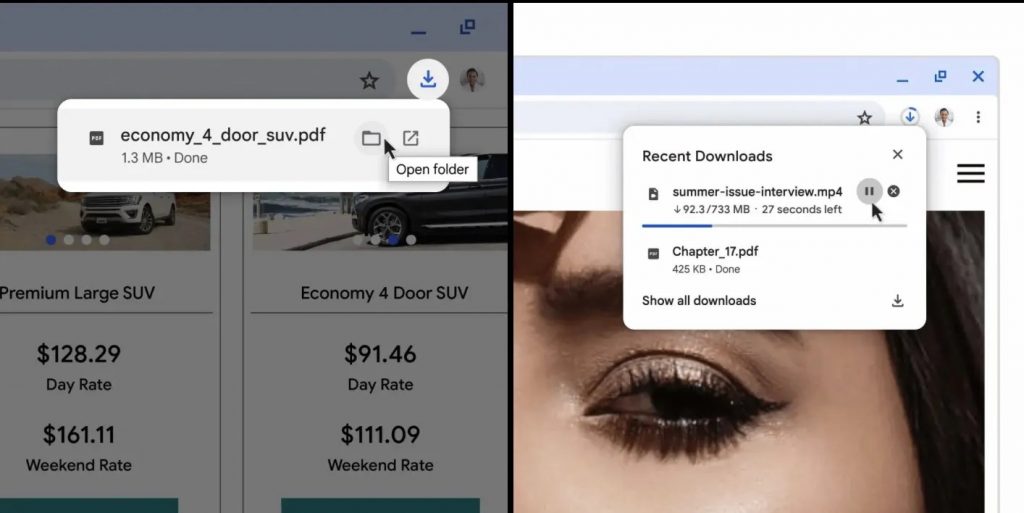
The new layout makes it easier to pause, resume, cancel, or re-download a file. In cases of suspicious downloads, Chrome still provides warnings as usual.
Furthermore, improvements have been made for mobile browsing:
The Chrome mobile browser now features a category called “trending searches” on a webpage, displaying suggestions (now up to ten instead of six) as you type. Similarly, when tapping on the URL section while on a site, a new category is displayed below listing related searches. Additionally, a new “Tap and Search” feature has been added, allowing users to tap on a word in the text to gather information on other related topics.
Final Thoughts
Hello #LavegaCrew,
At Lavega Games, we’re passionate about gaming and technology, and we’re excited to share the latest news with you. We understand that a high-quality gaming experience is important, which is why we strive to provide valuable insights and recommendations based on our extensive industry knowledge and connections. Don’t forget to connect with us on our social media channels where you can stay up to date on our latest projects and share your feedback with us. (Instagram, Reddit, Twitter, and GitHub).
Thank you for being a part of our community!
If you are interested in NFTs and Meta world, don’t forget to check out our LavegaPro website.